Adam's Travel Tips
June 4, 2025 • 👁️ Loading...
We travel international a lot and there are a some hacks that maybe people don't know.
Get a local eSIM
Depending on where you go, you can get amazing deals on local data plans. Most modern phones will let you install multiple eSIMS so you can keep your US number and also use the local networks for data. This works well on iOS devices. My favorite eSIM marketplace is an app called MobiMatter. I'm currently in France and using an eSIM I bought a year ago from them. You can search by country and length of stay and data, etc. I found an eSIM with a ton of data and a year expiration, so I was able to use it for multiple trips to Europe.
Tip: you can move an eSIM from one phone to another. I had to pay MobiMatter $3 to move my eSIM to my new phone since I had upgraded since last year. But it was pretty easy and took just a few minutes.
Most eSIMs don't give you a local number. So this can be frustrating when trying to deal with certain services. For instance our chiropractor in Paris uses a reservation system that only works if you can receive an SMS on a French number. Oh well. I was able to contact him on WhatsApp so that worked out.
In Vietnam there are local stores with loyalty programs and for Diag.vn it's much easier if you have a local number for receiving SMS messages. For Vietnam I recommend MobiFone, it's so cheap and they give you a local number.
But I digress. If you are going to be in country for a week, get a data only eSIM. User MobiMatter or some other eSIM providers. Compare prices. In some cases MobiMatter is great. Other times there are better deals depending on your country. For Vietnam you're better off going to a MobiFone office and getting a eSIM there. You will need your passport though. I got 6GB per day for a month for only $11 USD. That's a ton of data. And generally the network was faster than the wifi at our hotel, so I wouldn't even bother with the wifi.
Research Uber Alternatives
Uber works a lot of places, but sometimes the local competitor is better or sometimes Uber doesn't. In France I prefer Bolt most of the time. It's often cheaper and faster to get a car in Paris with Bolt. But I still use Uber when Bolt is flakey. Recently, 4 drivers cancel on me when trying to get a Bolt. I gave up and switched to Uber and got a driver in 5 minutes.
In Vietnam the gold standard is Grab. There is no Uber. Grab in Saigon also has motorbike options and amazingly cheap food delivery. Grab is amazing.
In Colombia and Mexico City for food delivery use Rappi. Similar to Grab but delivery only.
Use Apple Pay
Post Covid many countries are now almost cashless. I rarely use cash in Paris. You can use Apple Pay to buy a 1 € bottle of water and the vendor doesn't blink an eye.
Apple Pay is faster and more secure than using your credit card physically. Just make sure to use a card with no foreign transaction fees. Chase Sapphire Preferred or Venture X are great options. Beware of using the Chase Freedom cards for international charges.
Also never select USD when doing credit card transactions. When you do the credit card processor will do the conversion and they will screw you. I recently rented a car in Menorca and the woman automatically selected USD for me before I could say anything. I told her this was bad and complained but it was too late. I checked the conversion rate and sure enough, it bad. I was charged $94 when my banks conversion would have resulted in a $90 charge. A $4 reminder to be careful. It could have been worse.
Get a Schwab Account for ATM Access
Get a brokerage an checking account from Schwab. They are great. They have zero minimal balance and you can link your other bank accounts and easily move money between your main bank account and Schwab. (Or just switch banks, if you don't mind the hassle.) When you use a Schwab ATM card anywhere, whether in the USA or a foreign country, they will reimburse the ATM fees. I used it in Vietnam, got a great exchange rate, and Schwab reimbursed all the ATM fees at the end of the month.
Also never select USD when doing an ATM withdraw. Similar to the credit card exchange rate mentioned above, your bank will give you a better rate. Schwab will give you the market rate. If you let the local bank's ATM do the conversion, you will get screwed. Read the screens carefully. They try to make it confusing.
Here are some example screens from when I took out funds in Saigon from an HSBC ATM. Sorry for the glare.
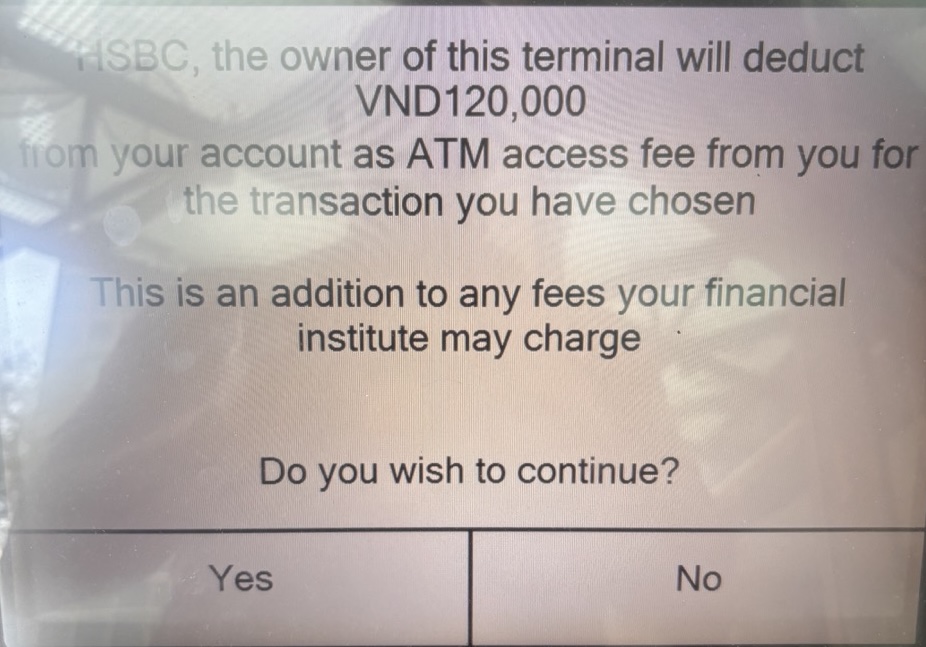
I accepted the fee and Schwab paid me back at the end of the month.
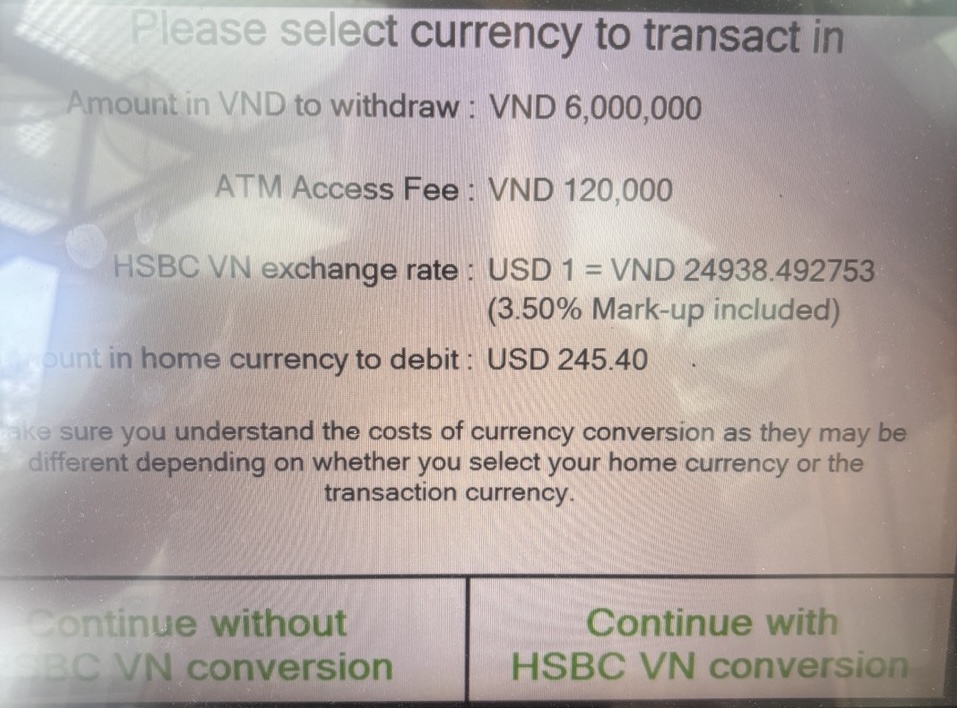
I declined the conversion and Schwab gave me a much better rate.
Google Maps Offline
It's a good idea to download the maps for the area you're going to in Google Maps. On iOS you can click on your avatar in the upper right and select Offline Maps and then select the area you want to download. This is a great option if you're going to be in an area that doesn't a have good cell coverage or if you're exploring with your cell service turned off to save money.
Google Maps and Public Transport
Google works great for public transportation like the Subway in NYC or the Metro in Paris. It will tell you which trains are delayed, which entrance or exit to look for. Which train to get next, etc. Generally it's pretty great overall.
WhatsApp, Zalo, etc.
Outside the USA most people use WhatsApp. The good thing about WhatsApp is that it doesn't cost anything to use and most people use it except in the USA and certain other countries like Vietnam, Korea, and China. To date WhatsApp doesn't have built in translate for some reason. Kudos to Zalo in Vietnam for building in the translate button. But on iOS you can copy the message and then select translate and this will help you move back and forth between languages.
Also texting a new number in WhatsApp is a pain. If you're on iOS you can create a shortcut to make this easier. Copy the number and then goto Safari and select this bookmark I created. This will make it super easy to send WhatsApp messages to new numbers and you don't need to add them to your contacts first, which is what WhatsApp normally wants you to do. See this repo if you're interested in how to set this up. It's awkward but I use it all the time.
Text Now
When abroad it's sometimes expensive or even impossible to call US numbers. I used to use Google Voice for this but it is weird on mobile and the web version doesn't work well. I installed Text Now and it works great. You can call 800 numbers and you can use the keyboard for touch tone menu navigation, something that is horrible on Google Voice. It's great for making outgoing calls but incoming calls are less reliable. I use the free plan on Text Now and it's fine for me. But they will change your number every few weeks, which doesn't matter for me since I use it for outgoing calls exclusively.
Of course you can use it for texting with people in the USA who don't use WhatsApp and it's a way to hide your real number if you want to text anonymously with people you don't really know.
WhatsApp chat with Meta on Airline Messaging Wifi
I'm sure this will change since most airlines are going to include free wifi in the coming years, but for now most of the flights I've been on will let you use iMessage and WhatsApp for free.
This is nice but if you want to look something up, you need web access, right? Not really. WhatsApp now has chat with Meta, their AI agent, built into WhatsApp. So if you're on a plane with only WhatsApp access you can still chat with Meta and ask it things, like the current price of BTC or pretty much anything. This is an interesting way to get more out of the free messaging service currently supported on most airlines these days.
That's a wrap!
I'll extend this post as I come up with other travel tips! Hope you found these useful!